Set up certificate-expiry notifications
Decide who gets warned before a certificate lapses, and how much notice they get.
If your organisation has certificate-expiry notifications enabled, Markular can send automatic reminders when a person's certificate or document is getting close to its expiry date. This gives you time to arrange a renewal before it lapses and becomes a gap. If the feature is not enabled for your organisation, these settings will not appear.
Before you start
- You need permission to manage People notification settings. If you cannot open the settings below, ask your Markular administrator.
- Decide how far ahead you want the first warning to go out, and who should receive it.
Steps
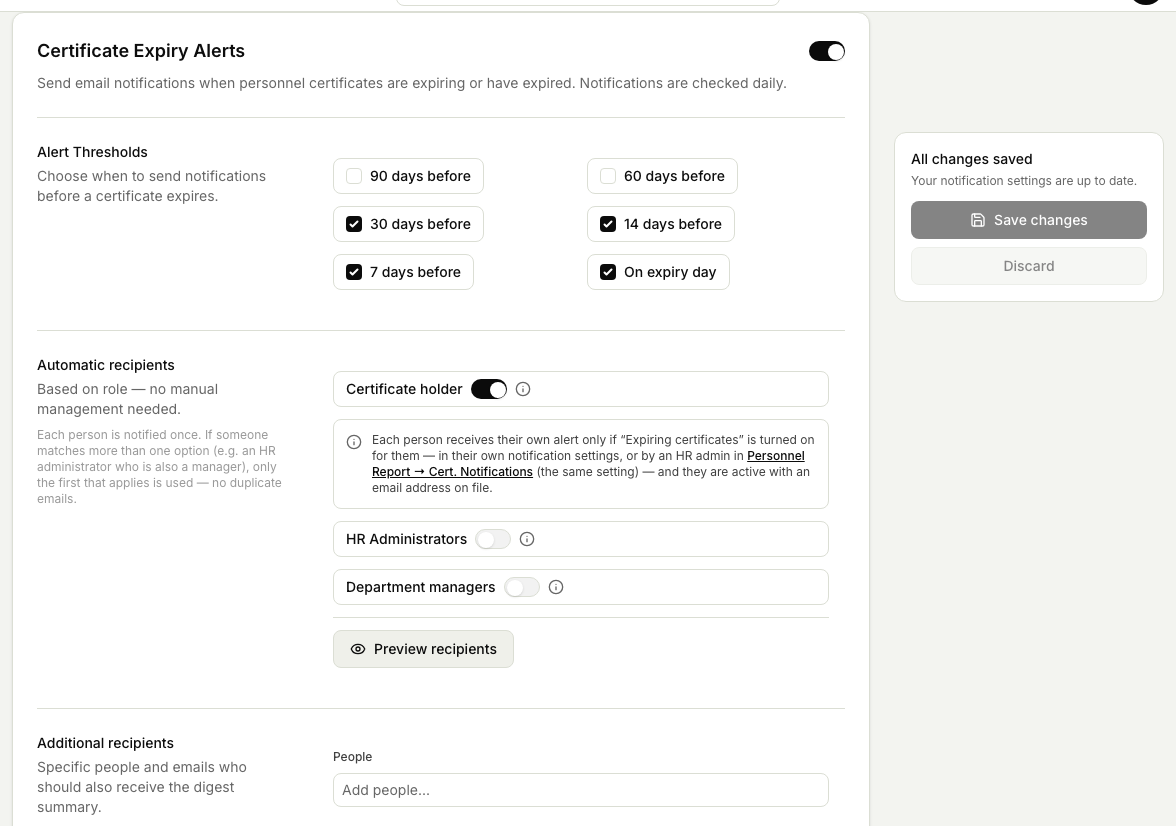
- Open People, then Settings, then Notifications (the Certificate Expiry Alerts page).
- Set how far ahead the reminders start, choosing one or more day thresholds before the expiry date (90, 60, 30, 14, or 7 days, or on the day). You can often set more than one reminder, so a person is warned again as the date gets closer.
- Choose who is notified: the certificate holder, HR administrators, and department managers. You can also add specific people or email addresses.
- Choose Preview recipients to check who the current saved setup will reach. Save any pending changes before previewing.
- Save. From now on, Markular sends reminders automatically as certificates approach the dates you set.
Good to know
- Notifications work from the expiry dates already recorded against people's certificates, so keeping those dates accurate keeps the reminders accurate.
- A selected person who is inactive or has no email address is clearly marked and will not receive email.
- Markular warns you when an enabled setup has no alert times or no recipients, so you can correct it before relying on the reminder.
- Each person receives one notification even if they match more than one recipient rule.
- To see which certificates are expiring right now, use the expiry view rather than waiting for a reminder. See Track certificate expiry.
Related articles
Was this article helpful?