Track certificate expiry
Certificates lapse, and an expired one can quietly block a person from being sent to work. The certificate expiry view lists what is expiring across your workforce so you can renew it before it becomes a problem.
An expired certificate can stop a mobilisation, the point at which a person travels out to an installation to start their tour. If a required certificate has lapsed, the person is not compliant for the job, so catching it early is a compliance task, not just an administrative one.
Before you start
- You need the View personnel permission. See the People permissions reference.
See what is expiring
- Open the People module, then Competencies, then Certificate Expiry.
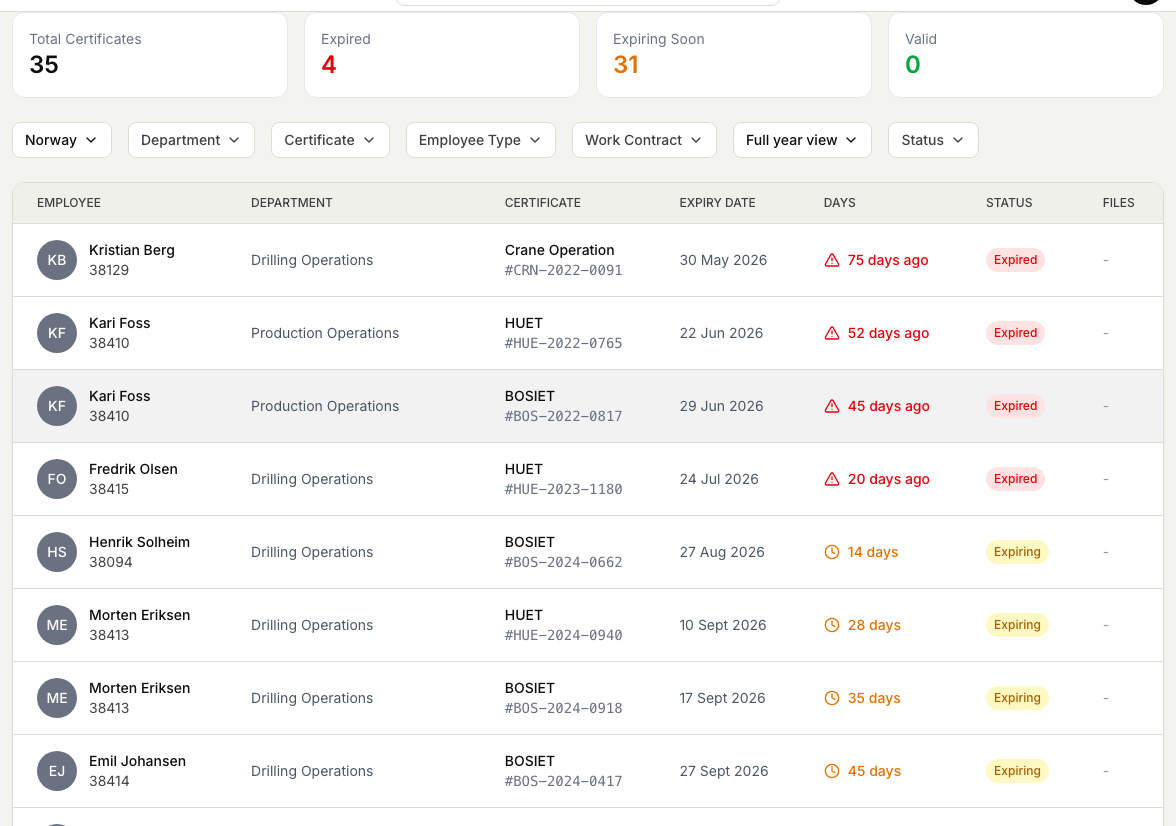
- The summary cards show the totals at a glance: how many certificates are Expired, Expiring Soon, and still Valid.
- Each row in the table is one certificate held by one person. It shows the person, their department, the certificate and its number, the expiry date, how many days are left (or how long ago it lapsed), and a status of Expired, Expiring, or Valid.
- Select a certificate name to jump straight to that person's competencies, where the certificate is highlighted, so you can check the detail or attach a renewed document.
Focus on the right time window
The view opens on the certificates for your own working country and the next 90 days. Adjust it to match what you are chasing.
- Use the Time Window filter to change the horizon: the next 30 days, next 90 days, next 6 months, a full year, or a view that also includes recently expired certificates. There is also an All expired option for a full clean-up.
- Narrow further by Country, Department, Certificate, Employee Type, or Work Contract.
- Use the Status filter to show only Expired, only Expiring, or only Valid.
Act on what you find
For each certificate that is expiring or expired, follow up with the person to get it renewed, then record the new certificate against them so the row turns green. Any attached document appears in the Files column, so you can open the current certificate without leaving the view.
When a group refreshed certificates together, you can tick them here and register them all in one pass, across several certificates at once. See Register completed courses for several people.
Get told automatically
You do not have to remember to check this view. Markular can send certificate expiry reminders so the right people hear in time. Setting this up is an administrator task. See Set up certificate-expiry notifications.