Attach documents to a person
Keep a person's paperwork with their record by attaching files such as a signed contract or a scanned certificate.
Before you start
- You need the Manage personnel permission. See the People permissions reference.
- Your organisation decides which document types a document can be filed under, so pick the one that fits what you are storing.
- A person's record holds two different kinds of documents, and this article covers the stored files. To understand which kind you need, see Personal files vs issued documents.
Steps
- Open the People module, then Directory, and open the person's record. See Edit a person's details.
- Go to the Documents section of the record.
- Drag the files from your computer onto the document list. A dashed frame with "Drop files here" appears while you drag. Drop them anywhere inside the frame. You can also select Upload and pick one or more files.
- The files are listed in the Upload documents panel. Pick the Document type for each file, so the document is grouped and easy to find later. If they all belong under the same type, choose it once in Set type for all. Remove a file you dropped by mistake with the bin icon next to it.
- Choose the Sensitivity for the files. Use Standard for ordinary personnel documentation, Sensitive for information that needs a smaller audience, and Highly sensitive for the most restricted material. The choice applies to every file in this upload.
- Select Upload. The panel closes, and a box in the bottom corner shows the progress, for example "Uploading 2 of 4 files". When every file is uploaded, the box says so and closes by itself after a few seconds. If a file fails, the box stays open with the reason and a Try again button, and the other files carry on.
A new document is private to you as its owner until you share it. To make it available to a colleague or a dynamic People access role, open the document menu and select Manage access. See Control who can open a personnel document.
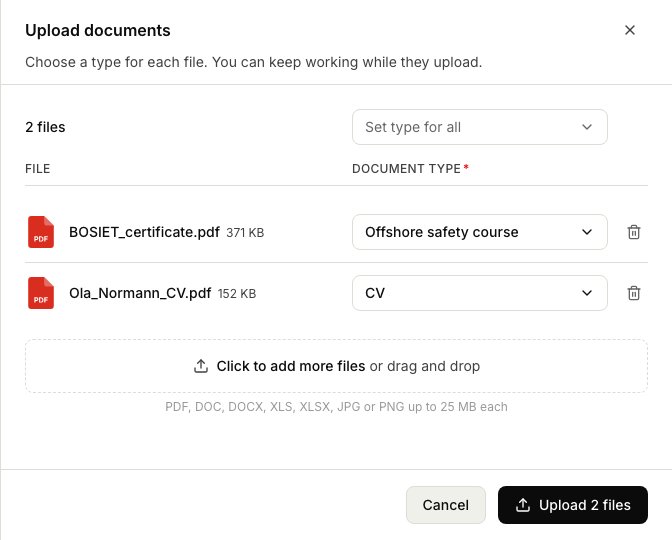
The document types come from your organisation's settings. A file that is larger than 25 MB, or of a type that is not allowed, stays in the list marked "Not allowed" and is skipped.
Related articles
Was this article helpful?