Browse the personnel overview
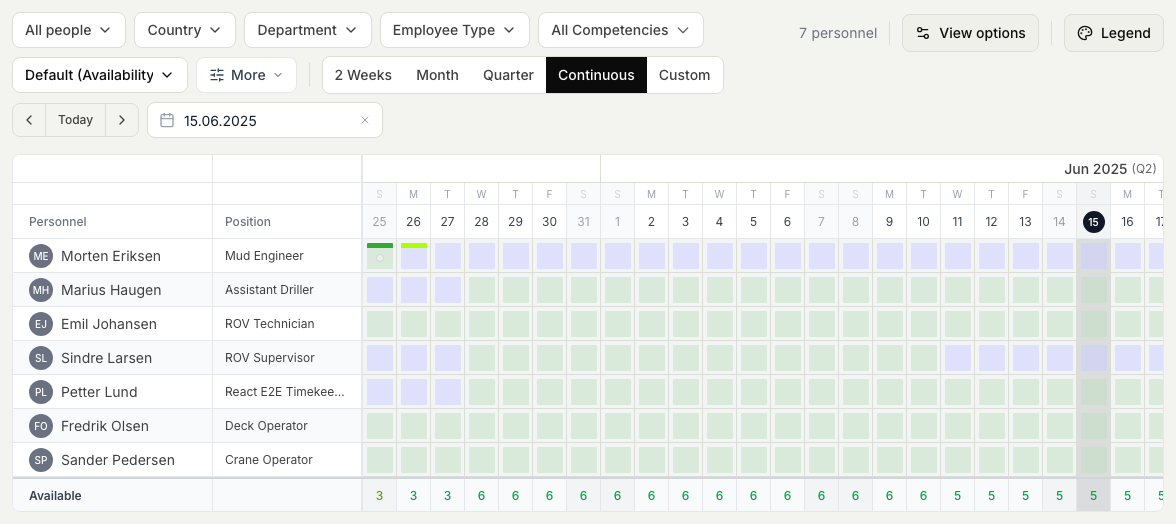
The personnel overview is a calendar-style view of your people over time. Each person has a row, and across the dates you can see their planned activities and when they are available. It is read-only, built for coordinators who need to see how the workforce lines up over the coming days and weeks. You need the View planning permission to open it.
Personnel overview or operations overview?
These two views answer different questions, so it helps to know which one you want:
- The operations overview is an at-a-glance snapshot of who is on board and available right now. Reach for it when you need today's picture.
- The personnel overview, described here, is the per-person calendar across dates. Reach for it when you want to see how each person's plan runs over time, not just this moment.
See Check who is on board today for the live snapshot.
Steps
- In Planner, open the Personnel overview. It loads a calendar with one row per person and the dates running across the top.
- Read each person's row from left to right to follow their planned activities and availability day by day.
- Move through time with the date controls to look further ahead or back over past dates.
- Narrow the list with the filters when you only care about part of the workforce, for example a single department or job type.
- Select a person to look closer at the trips and activities behind their row.
What this view is for
Because it lays every person out on the same timeline, the personnel overview is where you spot gaps and overlaps before they become a problem: two people off at once, a stretch with no cover, or a person free just when you need them. When you are ready to fill those gaps, move to the schedule board. See Work the schedule board.