Approve or lock individual days
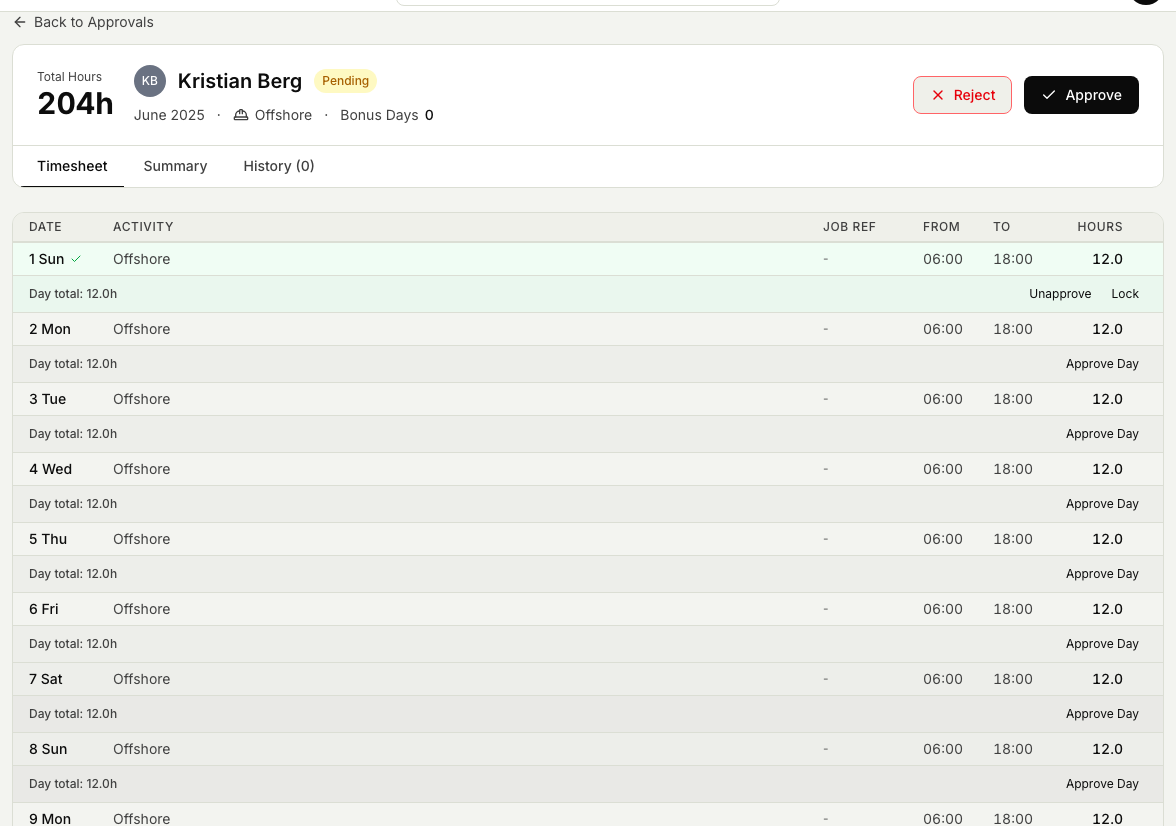
Once you know how to approve one timesheet at a time, working through an offshore timesheet day by day helps you clear a period faster. You can approve, unapprove, and lock single days without releasing the whole period at once.
Before you start
- You need the Approve timesheets permission. Without it you can open Timekeeper but you cannot approve anyone's hours.
- You can only act on the people you manage. A standard approver approves the people who report to them; an all-access approver or an administrator can approve anyone.
- If you have not approved a timesheet before, read the basic flow first in Approve or reject a timesheet.
Approve, unapprove, or lock a single day
Offshore timesheets are made up of individual days, and you do not have to release the whole period at once.
- Open the Timekeeper module, then Timesheet Approval, and open an offshore person's timesheet for the period.
- Approve the days you have finished checking. You can release part of a period and leave the rest for later.
- Unapprove a day if you approved it by mistake or need the person to change it. The day goes back to being editable.
- Lock a day you are done with (right-click it to lock) so it cannot be changed while the rest of the period is still under review.
Related articles
Was this article helpful?