Run the payroll export
Produce the payroll file for a month that has been signed off, so the figures can be handed to your payroll system.
Before you start
- You need the Run payroll permission. Being able to manage variable cost months does not by itself let you run the export; that is a separate permission.
- Timekeeper is a licensed add-on. If your organisation does not use it, you will not see these screens.
- The month must have had the final payroll sign-off first. See Approval and payroll sign-off.
Steps
- Open the Timekeeper module, then Payroll, then Payroll Export.
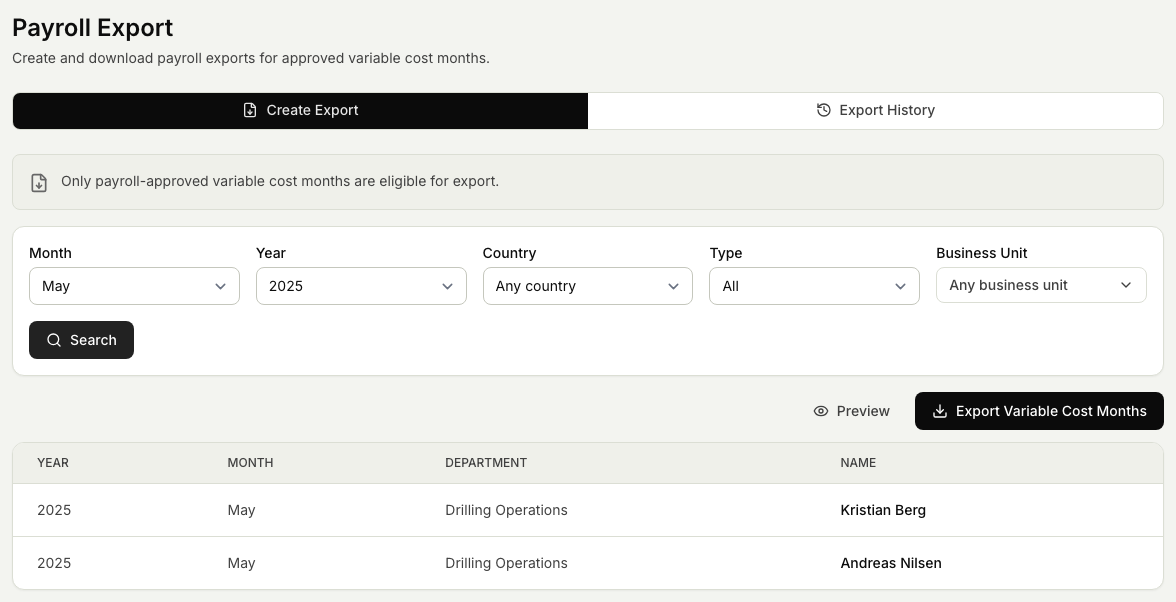
- Choose a month that has been signed off. Only signed-off months can be exported.
- Select Preview to check the figures. The preview shows what the file will contain without saving anything, so you can spot a problem before you generate.
- When the preview looks right, select Export Variable Cost Months. Markular produces the export files in the payroll format your organisation uses.
- Download the files and pass them to your payroll system.
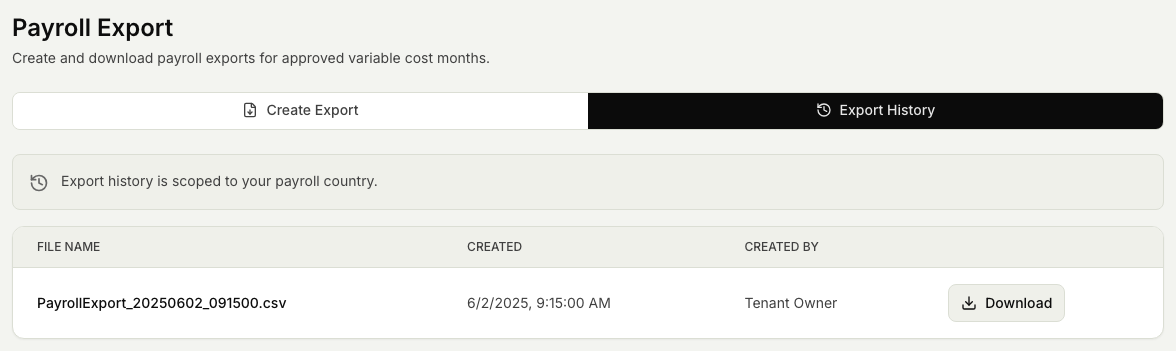
- To fetch an earlier export again, open the Export History tab and download it from the list. Previous exports are kept, scoped to your payroll country, so you can download them a second time without regenerating.
The Export History tab lists the files you have already generated, each with when it was created and by whom, and a Download action.
Related articles
Was this article helpful?