Manage a variable cost month
Build and work the payroll worklist for a single month so its bonuses and allowances are calculated and every entry is checked before the payroll file is produced.
Before you start
- You need the Manage payroll months permission.
- Timekeeper is a licensed add-on. If your organisation does not use it, you will not see these screens.
- The month draws on the bonus rules your organisation has set up. If a rule is missing or wrong, the calculated amounts will be too. See Set up bonus codes.
Steps
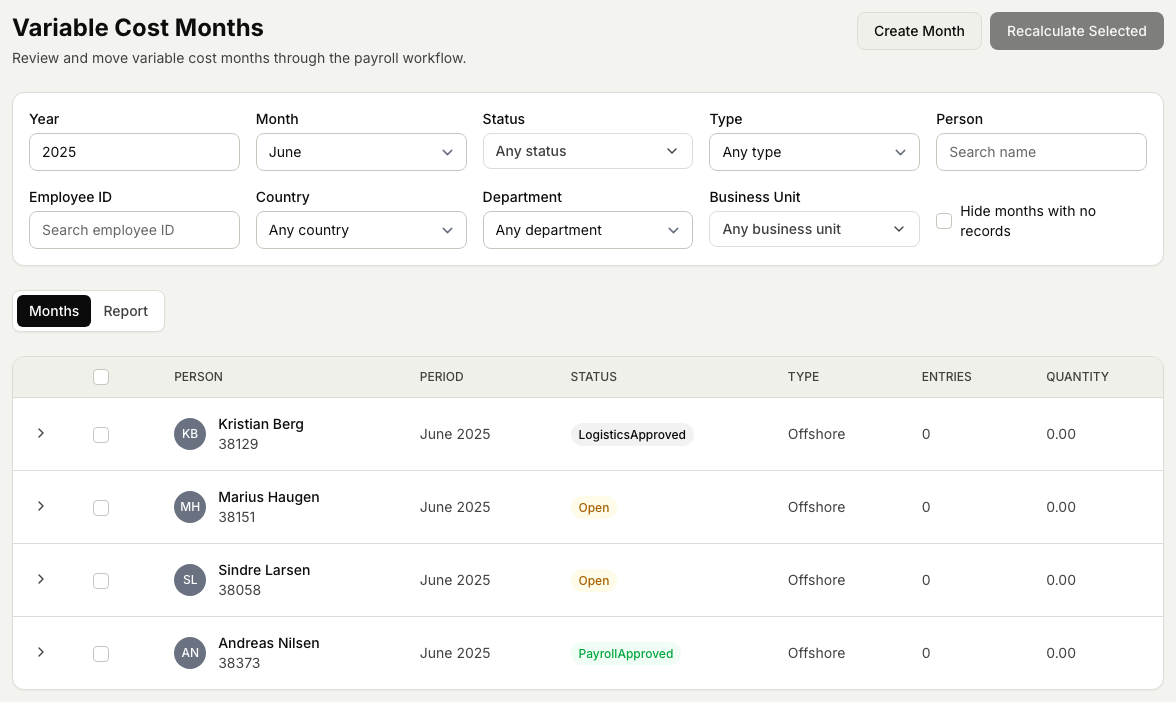
- Open the Timekeeper module, then Payroll, then Variable Cost Months.
- Select Create Month and choose the month you want to work. This creates the worklist (the variable cost month screen) for that period.
- Select Recalculate. Markular works out the bonuses and allowances for everyone in the month from the bonus rules automatically. Recalculate again whenever the underlying hours or rules change. The Country next to the recalculate buttons starts on the month's country; choose another to calculate the month under that country's rules, for example for someone who worked a job abroad. The month then belongs to the country you chose.
- Review the entries. Where you need to, edit an amount or add a manual bonus entry that the rules do not cover. Each cost type allows a range per day (Reisetillegg, for example, at most 1); a quantity outside it is not saved, and the message names the allowed range. Once the month is approved (locked) or exported, its entries can no longer be changed: an entry you add then is an adjustment, paid out in a later month you choose.
- Attach any supporting files the payroll team needs, for example a note explaining a manual adjustment.
- Move the month through its status steps as your checks are completed. If something is wrong, send the month back with a reason so it can be corrected before it goes any further: Re-open once logistics has approved it, Return for Adjustment once payroll has.
- When the month is checked and settled, it is ready for the next step, running the payroll export.
Related articles
Was this article helpful?