Manage bonus codes
Set up the allowances and bonuses your organisation pays so they are worked out for you.
Before you start
- You need the Manage Timekeeper settings permission.
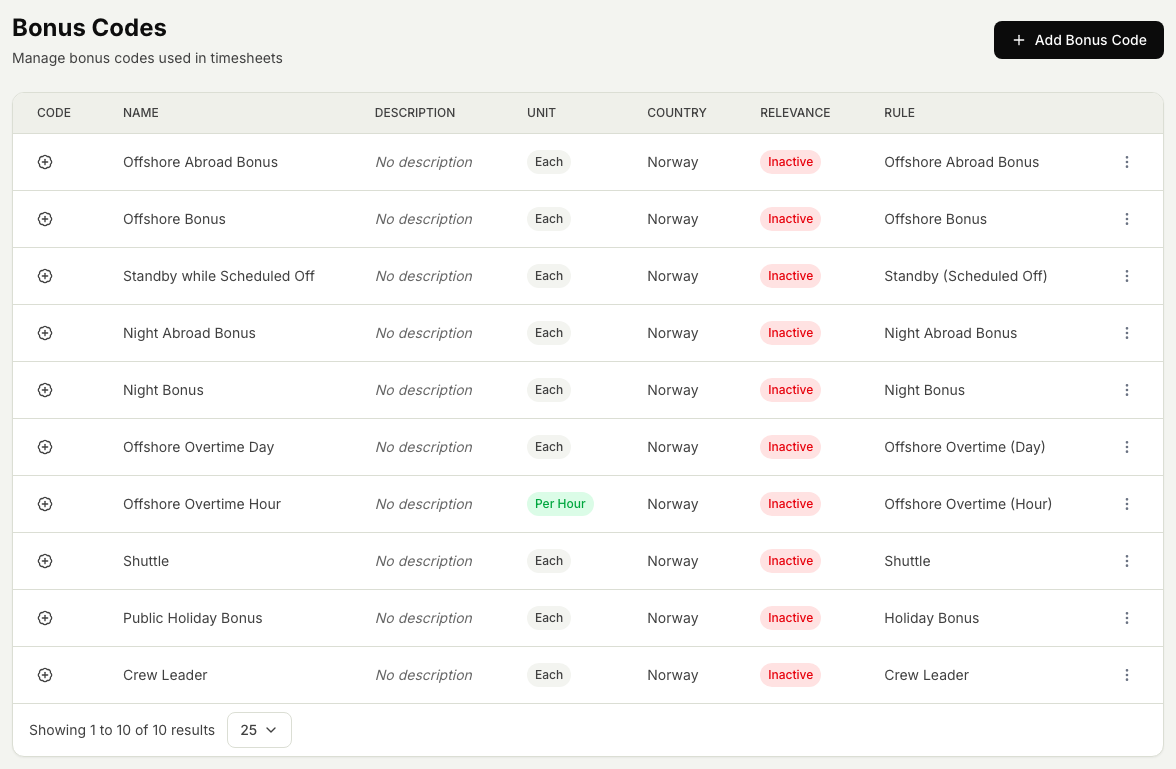
- Bonus codes are the allowances and bonuses you pay, for example offshore, night, overtime, standby, crew leader, holiday, and shuttle. Each one is attached to a rule that works out the amount for you.
How bonus codes work
Each bonus code has a rule behind it. When a timesheet is filled in, or a payroll month is recalculated, the rule works out the amount automatically, so you do not have to add most bonuses by hand. A person can still add a bonus by hand where that is needed. The amounts appear when the payroll month is worked out. See How variable cost months work.
Steps
- Open the Timekeeper module, then Settings, then Bonus codes.
- To add a code, select Add bonus code, enter a name people will recognise, choose the rule that works out the amount, and save.
- To change a code, select it, update the name or the rule, and save. Later payroll months use the updated settings when they are worked out.
- To remove a code, select it and choose Delete. Amounts already worked out on past payroll months are kept.
Related articles
Was this article helpful?