View my profile
Check the contact, position, and employment details your organisation holds about you.
Your organisation decides how each profile detail is maintained. Some details you can update yourself, some changes are reviewed by HR, and other information is managed for you. The full personnel record is still an administrator screen rather than part of your workspace.
Steps
- Sign in to Markular. Your workspace opens first.
- Open Profile in the workspace menu. The same page is a shortcut on the workspace home page and an entry in the menu under your avatar, top right.
- Read the two cards: Personal Information and Work Information.
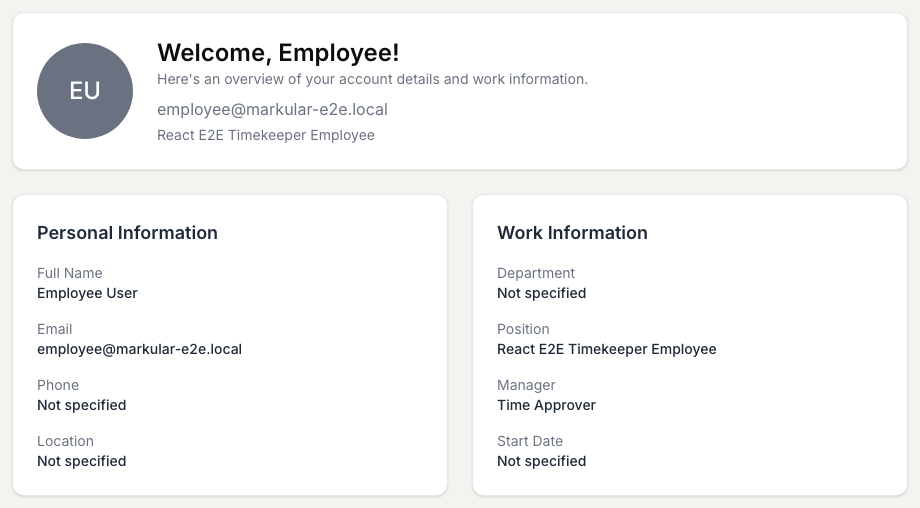
What you can see about yourself
- Personal Information: your full name, email, phone, and location.
- Work Information: your department, position, manager, and start date.
A field your organisation has not filled in shows Not specified. Your competencies and certificates have their own page; see View my competencies. Your notification preferences are under Settings in the workspace.
If a detail is wrong
Open Profile to see whether a detail can be changed from your workspace. If it is marked You can update this or HR approval, follow Update my details. For information marked Managed for you, note what should change and ask your HR administrator to correct it in the People module. Changes they make there appear the next time you open your profile.